Claimed work, not guessed work.
A pool worker claims the next ready task. AQ writes .aq/claim.json with the task id and claim epoch, and every later mutation checks that proof.
Agent-native orchestration
Agent Queue is built from the ground up for agents and humans to control through the same durable task graph, command layer and markdown policy. It runs Claude Code, Codex and Gemini CLI in isolated Git worktrees on your machine, carries finished branches to main, and keeps the history the next agent needs to continue the work.
git clone https://github.com/ElectricJack/agent-queue.git && cd agent-queue && ./setup.shmacOS 14+ or Windows (WSL2) · Python 3.12+ · PostgreSQL · tmux · one authenticated agent CLI
MIT. No AQ account, no waitlist. Your agent CLI still uses its vendor login.
main. The same graph is available to the dashboard, CLI, REST API and MCP clients.idlereadyrunningdoneblockedfailedAgent-native
AQ does not put an agent behind a human-only dashboard. The dashboard, aq CLI, REST API and MCP server converge on one command layer and one PostgreSQL record. An authorized agent can create and inspect tasks, claim work, add context, answer messages and close with evidence. The same scope rules protect every surface.
A pool worker claims the next ready task. AQ writes .aq/claim.json with the task id and claim epoch, and every later mutation checks that proof.
aq prime gives the worker its role, task, project context, recent task history and the commands available to that session.
The worker closes with an explicit outcome and summary. Session exit and task success remain different facts.
$ aq task claim --next --wait 60
claimed: docs-42 — Clarify the integration contract

$ aq prime
…role, task, project context and scoped commands…

$ aq task close --outcome pass --summary "Updated the contract. Checks passed."
closed: docs-42Agent-native does not mean unbounded. A session token is scoped to its task, project and role; operator commands remain operator commands.
Configuration
Playbooks define Agent Queue policy: which events start work, which rules run, where people decide, and how results move forward. Because that policy belongs to the project, projects do not merely get different names or themes. They can have genuinely different operating models.
Project 01
Turn specs into tasks, send each task through implementation and review, then integrate the branches that pass. Agent Queue is tuned for this workflow out of the box.
Project 02
Watch business events, maintain a durable knowledge graph, and pause for human decisions under a different set of rules. The same queue can run this project without pretending it is a software factory.
The software-factory policy ships today. Additional ready-made configurations are planned; until then, each project can define its own playbooks and policy.
One shared source of context
Project policy, specs, notes, and agent-facing configuration live together in a markdown vault. It is compatible with Obsidian, so people can browse and edit the same durable context agents use. Obsidian is optional; ordinary markdown files remain the source of truth.
Authorized agents and humans edit the same markdown files. The daemon validates changes and rebuilds their projections, so configuration stays inspectable instead of disappearing into a model's context.
# Claude Code

The default harness. Runs the `claude` CLI as a **full interactive TUI** — never
`claude -p` print mode — so a human can attach to the session and read it, and
so the daemon observes progress rather than blocking on a stream.

Edit this file to change how Claude is launched. It is read live by the vault
watcher; no restart, no release.

## Config

{ "command": "claude", "args": [], "prompt_mode": "arg", "permission_flag":
"--dangerously-skip-permissions", ...# OpenAI Codex
Runs the `codex` CLI as a full interactive TUI (same rationale as the claude
harness: attachable, observable, never a blocking print mode).
Edit this file to change how Codex is launched. It is read live by the vault
watcher; no restart, no release.
## Config
{ "command": "codex", "args": [], "prompt_mode": "arg", "permission_flag":
"--dangerously-bypass-approvals-and-sandbox", ...# Google Gemini CLI
Runs the `gemini` CLI as a full interactive TUI (same rationale as the
claude/codex harnesses: attachable, observable, never a blocking non-interactive
`-p` prompt).
Edit this file to change how Gemini is launched. It is read live by the vault
watcher; no restart, no release.
## Config
{ "command": "gemini", "args": [], "prompt_mode": "arg", "permission_flag":
"--yolo", ...# Claude · Deep (High)
## Role
You are a generic coding worker. A task has been assigned to you on an
isolated git worktree. Read the task's title, description, and any linked
spec; implement the change; run the tests; and close the task with a
concrete summary.
…
## Config
{ "harness": "claude", "lifecycle": "task", "needs_workspace": true,
"default_class": "deep-high", "workspaces": ["project-repo"] }
## Capabilities
{ "harness_tools": ["Bash", "Read", "Write", "Edit", "Glob", "Grep",
"Task", "TodoWrite", "Skill", "WebSearch", "WebFetch", "NotebookEdit"], ... }harness field is the only thing that selects a coding-agent CLI. Excerpts pinned to Agent Queue at 20712dad5.A bad edit is rejected instead of silently applied. Hot-reloadable files take effect without a daemon restart; settings marked restart-required say so.
The vault is local policy, not a hosted prompt library. Obsidian works with it, and nothing requires Obsidian.
Local-first
The daemon, the dashboard and every agent run on a computer you own. Nothing is hosted and there is no AQ account, so your agents work next to the desktop applications, GPUs and files already on that machine, and you can still reach them when you are somewhere else.
Yes, on macOS 14 or newer with Apple Silicon, and on Windows through WSL2 with Ubuntu 24.04. Intel macOS is a compatibility tier. AQ never locks you in to a vendor: it drives whichever agent CLIs you have already signed in to.
Support for cloud deployment is planned.
On Windows, AQ runs in WSL2 on the same PC as your desktop applications. Register an MCP server such as Blender MCP once and name it in a profile, and every worker on that profile can call its tools while it writes the code around them. Any tool in your game pipeline with an MCP server works the same way, and WSL can start Windows programs from the Linux side.
Limit: AQ launches the MCP servers you register. Blender MCP is a separate open-source project, not part of AQ.
Workers run on your own cores and memory, not in sandboxes or cloud VMs billed by the hour. The tuner sizes the fleet to the machine at install, so a workstation you already have becomes the factory floor.
Limit: Your model provider still bills for tokens, through your subscription or your API key, the same as when you run the CLI yourself.
Point AQ's own model calls at a model server on your GPU: any OpenAI-compatible endpoint, such as Ollama, set as llm.base_url with llm.provider: openai. Playbook model steps, plugin model calls and vault summaries then run on your hardware. A harness is a markdown file that names a command, its arguments and its environment, so a coding-agent CLI that talks to a local endpoint can join the fleet as a harness you write.
Near-term roadmap: A ready-made harness for a local-model CLI is planned. It is not in the current release.
Put the machine on a private VPN such as Tailscale and the dashboard opens on your laptop wherever you are. In the Agent flock view you watch each worker's live terminal and type straight into it: answer its question, correct its course or clear a stuck prompt. Closing the tab never stops the agent.
api_auth.trusted_dashboard_origins. The live terminals accept typing only over a connection on the machine itself, and only from the dashboard's own origin or one listed there.AQ does not install, configure or secure your VPN, and the dashboard has no login of its own yet, so your VPN's access rules decide who can reach it. Keep the dashboard off the public internet. Live terminals need the tmux session provider, sessions.provider: tmux in config.yaml.
Durable history
A task is more than the last chat transcript. AQ keeps the work outside the chat as a durable project record.
You do. AQ starts the same claude, codex or gemini you would start, with the same login. The shipped default, sessions.provider: subprocess, runs on any host but cannot be attached to; set sessions.provider: tmux in ~/.agent-queue/config.yaml and each agent runs in a tmux session available right in the dashboard. Direct harness use remains useful when you have one task and are at the keyboard. The gap appears when a large task uncovers more work: in one long conversation, compaction can push an important discovery out of the working context before it becomes a task.
AQ keeps that work outside the chat. Its database-backed state holds tasks and dependencies, plus the updates, findings and attributed comments agents add as work proceeds. Future agents working in the same project can find that history and those comments, building reusable project knowledge—not pretending a model remembers anything. That continuity, alongside coordination and scale, is what AQ adds.
Task and session history survive agent exits and daemon restarts. aq prime can place the task's recent history and the project's maintained context in a worker's starting prompt. Agents can add notes and comments while they work, and humans can correct the markdown source directly.
attempt 1  rate limit · returned to queue
attempt 2  pass · summary recorded
delivery validated · branch publishedReflection playbooks will review completed task records, extract recurring failures and successful strategies, and maintain scoped project memory for later workers to retrieve. The durable evidence and extension points exist; automatic reflection and memory retrieval do not ship enabled by default today.
How it runs
The control path is deterministic on purpose. Models do the work that needs judgment; code owns readiness, claims, isolation, recovery and delivery policy.
You or an authorized agent creates one task, or validates a task graph before committing it.
Dependencies, gates, capacity and project policy decide when work is admissible.
The task gets its own Git worktree and aq/<task-id> branch.
Claude Code, Codex or Gemini CLI runs in an observable session with the task and project context.
It pushes its branch and closes with an outcome, summary and verification evidence.
A separate, restartable job validates and publishes the branch. Closing never means “merged” by accident.
The dashboard
The dashboard is the human view of the same records agents use. Watch ready work move through the graph, inspect live sessions, review a task's attempts and decide a gate without creating a second source of truth.
Stop 1 · Graph
Every node is a task and every edge is a typed dependency. Color shows status; the explanation view names why blocked work is not running.
Captured from a seeded demo install · dashboard at 8dfb927a · /projects/aurora-ledger/graph
Stop 2 · Workers
Each tile is an observable agent session. With sessions.provider: tmux, attach from your terminal without moving the work into a separate chat. The shipped subprocess default has no attach or live terminal view.
Captured from a seeded demo install · dashboard at 8dfb927a · /projects/aurora-ledger/sessions
Stop 3 · Record
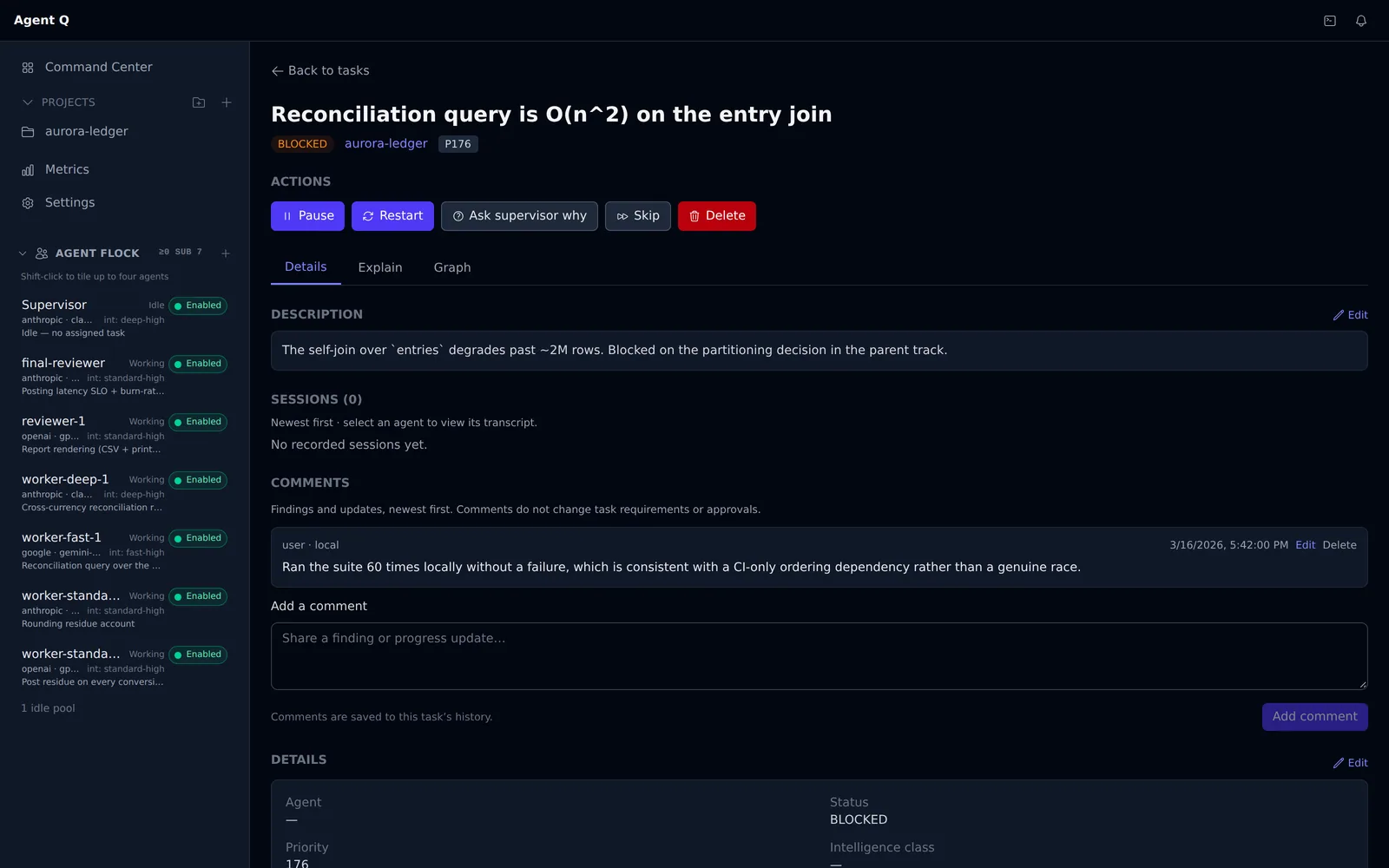
One task keeps its attempts, comments, summary and outcome together.
Captured from a seeded demo install · dashboard at 8dfb927a · /tasks/vivid-delta.3.3
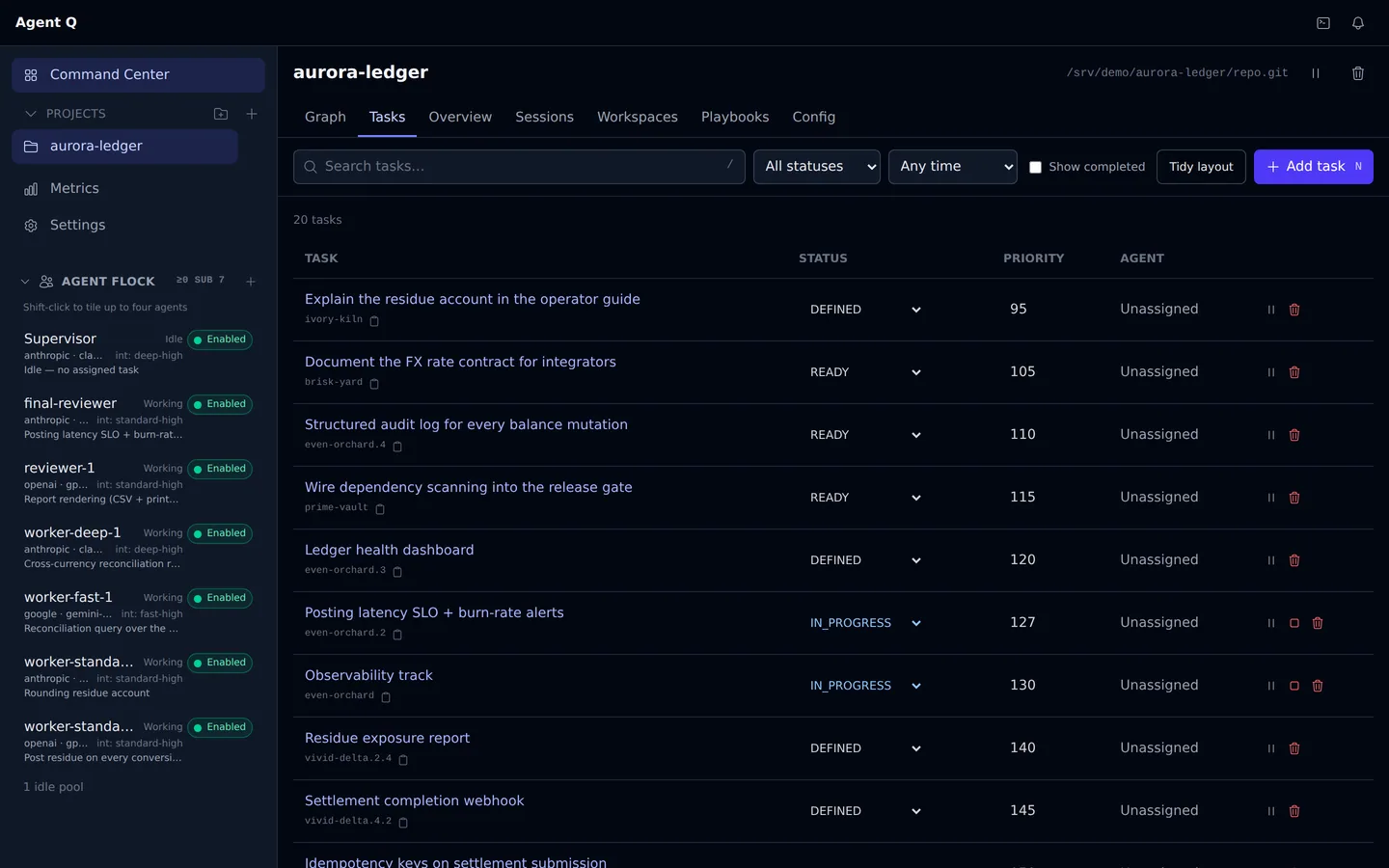
Stop 4 · Delivery
Integration shows what it validated, what it published and what still waits under project policy.
Captured from a seeded demo install · dashboard at 8dfb927a · /projects/aurora-ledger/tasks
Stop 1 · Graph
Every node is a task and every edge is a typed dependency. Color shows status; the explanation view names why blocked work is not running.


Captured from a seeded demo install · dashboard at 8dfb927a · /projects/aurora-ledger/graph
Stop 2 · Workers
Each tile is an observable agent session. With sessions.provider: tmux, attach from your terminal without moving the work into a separate chat. The shipped subprocess default has no attach or live terminal view.


Captured from a seeded demo install · dashboard at 8dfb927a · /projects/aurora-ledger/sessions
Stop 3 · Record
One task keeps its attempts, comments, summary and outcome together.


Captured from a seeded demo install · dashboard at 8dfb927a · /tasks/vivid-delta.3.3
Stop 4 · Delivery
Integration shows what it validated, what it published and what still waits under project policy.


Captured from a seeded demo install · dashboard at 8dfb927a · /projects/aurora-ledger/tasks
Built with itself
Agent Queue runs its own development work. The record below comes from Git, not an animated counter or a model estimate.
Neither, exactly. Agent Queue was started by ElectricJack, with contributions from Darcyle, and it grew from necessity: one person with more work queued than one chat could hold. It is built with itself, so the commits counted below landed on Agent Queue's own repository, integrated by Agent Queue, and it is already delivering value on the boxes it runs on. The repository holds 4,779 commits since February 2026 and 598 test files with 11,861 tests. It exists to help the world build bigger and faster, and it is MIT and will remain open source forever. It is under active development; expect to read logs and use aq doctor.
commits authored by AQ workers on Agent Queue's own main
2026-09-09 · 00:00–24:00 PDT
21 of 24 hours · first 00:02 · last 23:57
94 integration merges, same window
6 worker profiles on 2 harnesses
Measured from git log on main. Humans committed to the same branch that day. Three harnesses ship; Claude Code and Codex CLI did the work in this measured window.
Accounts and billing
A profile names one harness, and a harness names one CLI and the sign-in or key it runs with. Run several profiles, on one provider or three, and their workers claim from the same queue. When a session dies on a rate limit, that profile's pool is quarantined for the cooldown and the task goes back to the queue, so a worker on another account picks it up instead of everyone waiting out one window. Where a provider reports its usage window, the dashboard charts it.
Each CLI signs in through its vendor's own flow, and AQ never handles the login. On a personal box that can be the subscription you already pay for, on the vendor's unmodified CLI, used the way that vendor's terms allow for your own plan. A business can point its workers at API billing and organizational credentials instead, which is the route both Anthropic and OpenAI document for programmatic and multi-user work. Read your provider's current terms; this is product guidance, not a legal guarantee.
Shipped today: Claude Code, Codex CLI and Gemini CLI. More harnesses and providers are planned. Until one ships it is not supported, and because a harness is a markdown file, you can author your own before then.
$ TZ=America/Los_Angeles git log --since='2026-09-09 00:00:00' --until='2026-09-09 23:59:59' --no-merges --format='%h  %an  %s' 20712dad5 | head -6
d4ba715b2  aq standard-high-claude  test(install): cover the composed installer end to end
08593c693  aq standard-high-codex  docs(install): add platform onboarding guides
3a907a65f  aq standard-high-claude  docs(skills): document the real gate-list/show/resolve CLI options
329f9c82e  aq standard-high-claude  docs(discord): name the real gate-resolution command
d3e55a7c9  aq standard-high-claude  feat(install): add repair, upgrade and uninstall paths
b98021ed6 aq standard-high-codex feat(install): report first-task readinessA measured number older than 30 days is refreshed or removed. It is never silently carried forward.
What ships
AQ separates shipped behavior, policy configured on one installation and proposed work. The labels below are product state, not release theater.
Durable tasks and dependencies. Scoped claims. Isolated worktrees. Observable Claude Code, Codex and Gemini CLI harnesses. One command layer behind the dashboard, CLI, REST API and MCP. Explicit completion and restartable integration. Hardware-aware install tuning and aq doctor.
The measured day above ran on Agent Queue's own repository in development integration mode, which batches validated branches straight to main. A fresh aq install turns on pull-based worker pools and delivers each task as a pull request; project integration stays disabled until you choose a mode.
Automatic reflection over completed work. Scoped project memory distilled from durable task evidence. Retrieval that gives later agents useful patterns without turning generated summaries into an uneditable source of truth.
PostgreSQL is the only supported durable backend. AQ is an active open-source project with no hosted service or SLA. You own the box, the policy and the logs.
The dashboard shows you every task's record, branch and delivery. For the code itself, the same maintainer builds Outrider, a native code map that draws your whole repository to scale with git churn on every box, so the parts the fleet touched last night glow before you open a file. It is a separate tool; neither requires the other.
Gas City is a valid, mature solution and the closest open-source neighbor. It is an SDK for composing your own orchestrator, and by default it keeps its state in Beads, a work ledger stored in Dolt. AQ differs in two places. Task assignment is more deterministic: scheduling, dependencies, gates and recovery are code against a PostgreSQL queue, so the same queue yields the same assignments and no LLM tokens are spent deciding them. And the first run is minutes from install: one command installs, tunes and starts it, and the dashboard, worktrees and harness profiles are built in. You do not assemble the fleet yourself. Both are MIT. Read both before choosing.
Install
One command clones Agent Queue and starts its resumable installer. It checks the box, reuses or installs prerequisites, writes tuned local configuration, starts the daemon and tells you whether the first task can run.
git clone https://github.com/ElectricJack/agent-queue.git && cd agent-queue && ./setup.shmacOS 14+ or Windows (WSL2) · Python 3.12+ · Git · PostgreSQL · tmux · one authenticated Claude Code, Codex or Gemini CLI
OK Database
OK Daemon
OK Dashboard
OK Agent authentication
OK Profile routing
OK Workspace prerequisites
!! Project root: none configured yetAQ never logs you in to an agent vendor. If authentication is missing, the installer pauses and gives you the command to run in your own terminal.
From the work
Design decisions, subsystem walkthroughs and measured runs from the repository. Every post says when it was written, when it changed and how its numbers were produced.
Agent Queue used to answer that in a log line nobody could query. Making it answerable turned readiness from a scan into one indexed column, and every kind of waiting into the same kind of row.